Automation & Lead Systems
Lead Systems That Make Sure No Enquiry Gets Missed
A good website and steady traffic only pay off if someone picks up the enquiry. Most small businesses I work with lose leads in the gap afterwards: a form that sits in an inbox, a call missed while you’re on a job, a quote that never gets chased.
✓ Form and call tracking · ✓ Instant enquiry notifications · ✓ Auto-replies and follow-ups
What I Can Set Up
Your Website, Your Traffic and Your Follow-Up, Working Together
I set up what I call revenue systems. Your website, your traffic and your follow-up joined up, so every enquiry is captured, answered quickly and tracked through to a job. Nothing fancy for the sake of it, just the pieces that save you time and stop work slipping through the cracks.
I build these around the tools you already use where I can, and I keep them simple enough that you understand how they work.
Form and Call Tracking
I make sure every form submission and phone call from your website and ads is recorded, so you know how many enquiries you’re getting and where they came from.
Instant Notifications and Auto-Replies
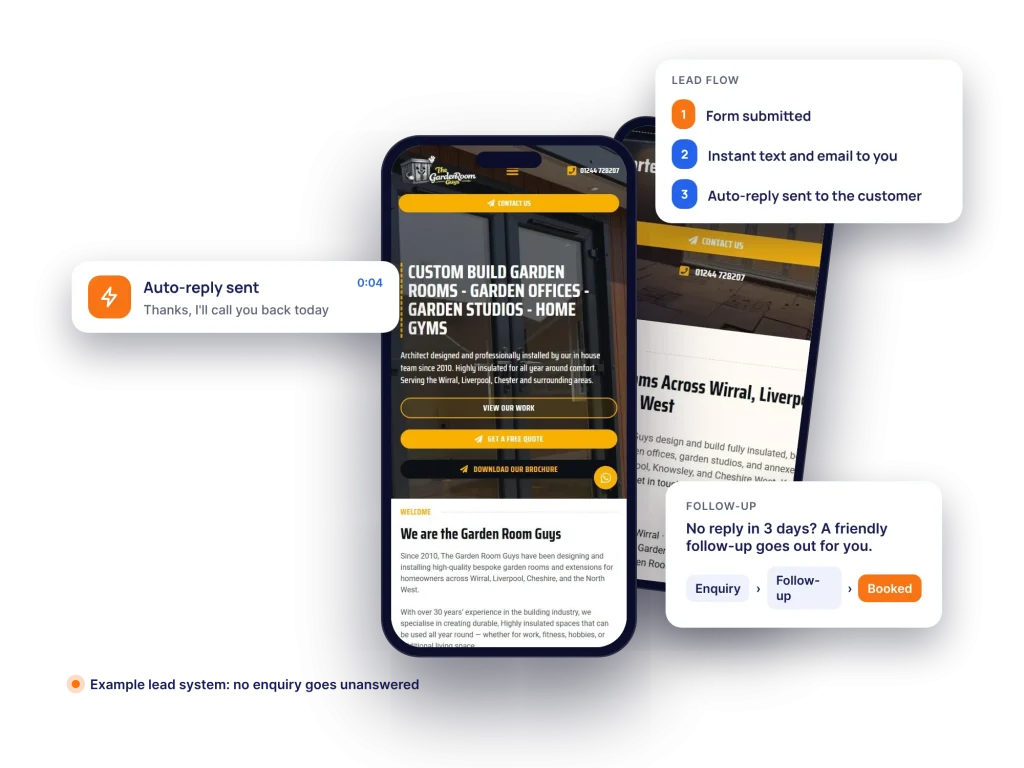
New enquiries land on your phone or inbox straight away, and the customer gets a friendly reply confirming you’ve received it and what happens next.
Follow-Up Emails
If a quote goes quiet, a short follow-up goes out automatically after a few days. Written in your words, not a template that sounds like a robot.
CRM or Simple Pipeline
Somewhere to see every lead and where it’s up to: new, quoted, won or lost. That could be a proper CRM or a simple pipeline, depending on what suits you.
Missed-Call Text Back
Where it makes sense, a missed call triggers a text so the customer knows you’ll ring back, rather than trying the next business on Google.
Review Requests and Booking Links
When a job is done, a review request goes out automatically. Booking or calendar links let customers pick a time for a call or visit without the back and forth.
My Process
How It Works
01
Free Call
We talk through how enquiries reach you now, what tools you use and where things get missed.
02
Plan and Quote
I suggest what’s worth setting up, and what isn’t, with a clear fixed quote.
03
Build and Test
I set everything up, test it end to end with real form fills and calls, and show you how it works.
04
Check In
Once it’s running, I check the data is coming through properly and adjust anything that needs it.
What I Can Set Up
Every business is different, so I start by looking at how enquiries reach you now and where they get lost. Then I build only what’s useful. A typical setup includes some or all of these.
- Form and call tracking
- Instant enquiry notifications
- Auto-replies and follow-ups
- Simple CRM or pipeline
- Missed-call text back
- Review request automation
- Booking and calendar links
- Conversion tracking dashboards
Common Questions About Automation & Lead Systems
How much does it cost?
It depends on scope. A few notifications and auto-replies is a very different job to a full CRM and reporting setup. I’ll quote after a free call once I know what you need. You can also see my general pricing.
Which tools do you use?
Wherever possible I work with what you already have: your website, email, Google Business Profile and any booking or job management software. For connecting things together I often use tools like Make.com, plus GA4, Google Tag Manager and Looker Studio for tracking and reporting. I’ll recommend a CRM only if you actually need one.
Do I need a new website?
Not usually. Most of this can be added to your existing site. If your current website makes tracking or capturing enquiries difficult, I’ll tell you honestly, and website design is something I do as well.
Is my data safe, and is this GDPR compliant?
I keep data handling simple and only collect what you need to deal with enquiries. I use established tools with proper security, set up accounts in your name so you own the data, and make sure forms and follow-ups fit with your privacy policy. If you’re unsure about any part of it, we’ll go through it together.
How long does setup take?
Most setups take 1 to 3 weeks, depending on how many pieces are involved and how quickly I can get access to your accounts. Simple notifications and auto-replies can often be done much sooner.
Will automated messages make my business feel impersonal?
Not if they’re done well. I write messages in your tone, keep them short, and use them to buy you time, not replace you. The customer still deals with you, they just hear back faster.
Is AI going to write things about my business without anyone checking?
No. Anything AI drafts is checked and edited by a person before it’s used. I use it to save time on first drafts and admin, not to put unchecked content in front of your customers.
Get In Touch
Stop Losing Enquiries You've Already Paid For
Book a free call with me. We’ll look at how enquiries reach you now, where they’re getting missed, and what’s worth automating. No obligation, just practical advice.
Call me on 07495 366801 or email cameron@metaedgemarketing.com.
✓ Free 30-minute strategy call ✓ No obligation or pressure ✓ Honest advice even if I'm not the right fit
Why MetaEdge
Why Businesses Work With Me
No account managers. No middlemen. I handle your account directly, from strategy through to execution.
You'll always know what's working, what isn't and what I'm doing about it. No hiding behind vanity metrics.
Conversion tracking, analytics, WordPress development and ad platform setup. I go deeper than most agencies can or will.
My best client relationships have run for years, not months. I grow when you grow.
Trusted by trades, local services and growing SMEs across the UK